Ein Produkt funktioniert technisch vielleicht einwandfrei.
Die Buttons reagieren. Die Formulare speichern die richtigen Daten. Das System tut, was das Team geplant hat.
Trotzdem tun sich Nutzer damit schwer.
Sie verlieren den Überblick. Sie klicken den falschen Button. Sie übersehen wichtige Schritte. Oder sie wenden sich für Aufgaben an den Support, die sich einfach anfühlen sollten.
Genau hier zählt Usability.
UXQB CPUX hilft dir, Usability, User Experience und nutzerzentrierte Gestaltung klar und strukturiert zu verstehen. Es hilft Teams, genauer auf echte Nutzer, echte Aufgaben und die tägliche Nutzung eines Produkts zu schauen.
Du könntest dir diese Themen selbst aneignen. Aber UX wird oft leichter, wenn du echte Beispiele siehst, Übungen machst, Input von einem Trainer bekommst und die Ideen mit anderen durchsprichst.
Deshalb hilft eine CPUX-Schulung.
In diesem Artikel haben wir versucht zu erklären, was UXQB ist, warum Usability zählt und wie die richtige CPUX-Schulung dir hilft, deinen nächsten Schritt zu wählen. Die vollständige Kursliste, die Stufen, Prüfungsdetails und Schulungsoptionen findest du auf der UXQB-Boardseite bei BilduX.
Das Produkt funktioniert. Aber können Menschen es bedienen?

Ein Produkt kann jede Anforderung erfüllen und sich trotzdem schwer bedienen lassen.
Es enthält vielleicht alle geplanten Funktionen. Es besteht vielleicht jeden Test. Technisch funktioniert alles wie erwartet. Aber wenn sich die Oberfläche verwirrend anfühlt, stoßen Nutzer trotzdem auf Probleme.
Du merkst das oft in kleinen Momenten.
Menschen bitten bei einfachen Aufgaben um Hilfe. Formulare wirken zu lang oder unklar. Die Navigation ist schwer nachzuvollziehen. Nutzer machen immer wieder dieselben Fehler, weil das Produkt sie nicht gut genug führt.
Das passiert oft, wenn Teams auf Annahmen statt auf echten Nutzerbedürfnissen aufbauen. Feedback kommt zu spät, häufig erst, wenn das Produkt schon live ist.
UXQB hilft, weil es Teams eine gemeinsame Denkweise zu Nutzern, Aufgaben, Kontext, Gestaltung und Evaluation gibt. Es macht die Arbeit weniger von Meinungen abhängig und stärker davon, was Menschen bei der Nutzung wirklich brauchen.
Was ist UXQB?
UXQB steht für International Usability and User Experience Qualification Board.
Es hat das CPUX-Zertifizierungsprogramm entwickelt. CPUX bedeutet Certified Professional for Usability and User Experience.
CPUX konzentriert sich auf Usability, User Experience und nutzerzentrierte Gestaltung.
Es hilft Menschen, strukturierter mit Nutzerbedürfnissen, Nutzungskontext, Gestaltungslösungen und Usability-Evaluation zu arbeiten.
Warum Usability und UX zählen
Gute Software besteht nicht nur aus den richtigen Funktionen.
Menschen müssen ihre Aufgaben ohne Stress, Verwirrung oder zusätzliche Hilfe abschließen können.
Nutzer denken nicht immer wie das Team hinter dem Produkt. Ein Ablauf wirkt für das Team vielleicht klar, weil es weiß, wie alles funktioniert. Für jemanden, der das Produkt zum ersten Mal nutzt, kann derselbe Ablauf verwirrend sein.
Klare Abläufe helfen Menschen, weniger Fehler zu machen. Gute Usability senkt den Bedarf an Support. Eine bessere User Experience schafft außerdem Vertrauen, weil Menschen sich bei der Nutzung verstanden fühlen.
Usability-Tests helfen Teams, Probleme früh zu erkennen. Klares Design und Barrierefreiheit sorgen dafür, dass mehr Menschen das Produkt ohne Hürden nutzen können.
Usability-Arbeit hilft Teams, das Produkt mit den Augen der Nutzer zu betrachten, bevor aus kleinen Problemen teure werden.
Für wen ist eine UXQB-Schulung gedacht?
Eine UXQB-Schulung ist für mehr als nur UX-Designer.
Viele Menschen arbeiten mit digitalen Produkten, Nutzerbedürfnissen, Oberflächen und Produktqualität. UXQB gibt ihnen eine gemeinsame Basis und eine klarere Sprache für Usability.
UX- und UI-Designer
UX- und UI-Designer nutzen die CPUX-Schulung, um eine stärkere Basis in Usability, nutzerzentrierter Gestaltung, Nutzeranforderungen und Evaluation aufzubauen.
Die Schulung gibt ihrer Designarbeit eine klare Methode, nicht nur eine visuelle Richtung.
Product Owner und Produktmanager
Product Owner und Produktmanager müssen Nutzerbedürfnisse, Produktziele und Feedback verstehen.
Die CPUX-Schulung hilft ihnen, bessere Produktentscheidungen zu treffen. Sie hilft ihnen außerdem zu erklären, warum eine Designentscheidung wichtig ist.
Business Analysten und Requirements Engineers
Business Analysten und Requirements Engineers arbeiten eng mit Bedürfnissen, Zielen und Anforderungen.
UXQB passt gut zu dieser Arbeit, weil es Nutzeranforderungen, Nutzungskontext und nutzerzentrierte Gestaltung abdeckt.
Tester und QA-Teams
Testen bedeutet mehr, als nur zu prüfen, ob eine Funktion läuft.
UXQB hilft Testern, Usability-Tests und die Evaluation von Benutzeroberflächen zu verstehen. So erkennen sie Probleme aus der Sicht der Nutzer.
Entwickler und Softwarearchitekten
Entwickler und Softwarearchitekten treffen Entscheidungen, die Menschen später bei der Nutzung eines Systems spüren.
Die CPUX-Schulung hilft ihnen, Nutzerbedürfnisse zu verstehen, bevor technische Entscheidungen festgelegt sind.
Projektmanager und agile Teams
Projektteams brauchen ein gemeinsames Bild von Nutzern, Aufgaben und Produktzielen.
Eine UXQB-Schulung hilft Teams, Usability früher in Planung und Umsetzung zu bringen. So wird UX von Anfang an Teil der Arbeit, statt etwas, das Teams zu spät besprechen.
So funktioniert der UXQB-CPUX-Zertifizierungspfad
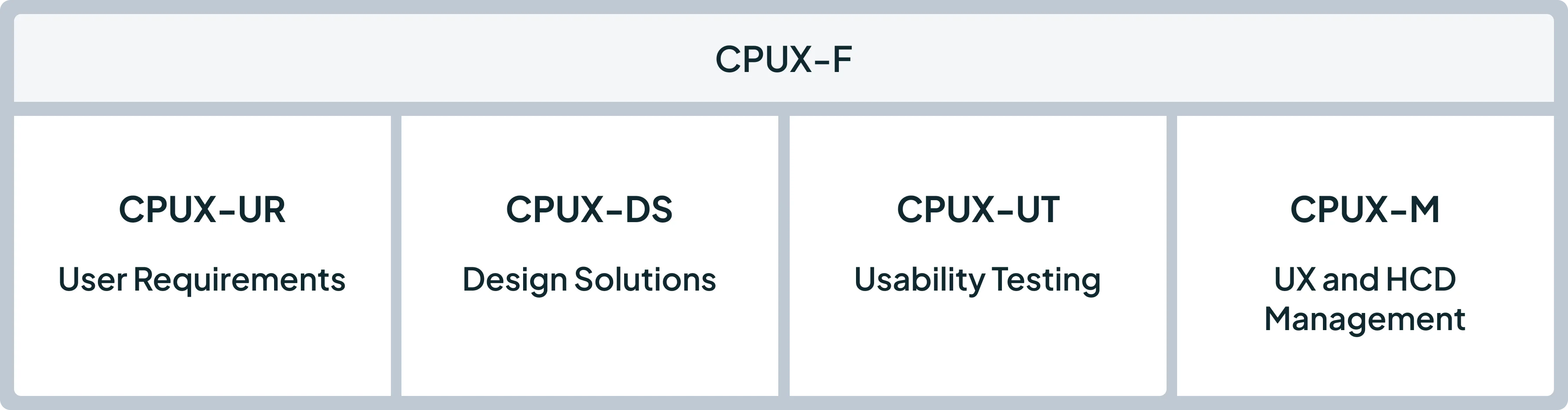
Der CPUX-Pfad gibt dir einen klaren Weg, deine UX-Fähigkeiten auszubauen. Du startest mit den Grundlagen und gehst dann je nach Rolle und Zielen in fokussiertere Themen.
Du musst nicht von Tag eins an jeden CPUX-Kurs kennen. Wichtig ist nur, dass du den Kurs wählst, der zu deiner aktuellen Arbeit und den UX-Fähigkeiten passt, die du verbessern willst.
CPUX-F: Foundation in Human-Centred Design
Ziel: CPUX-F ist für die meisten Menschen der beste Startpunkt.
Du lernst die zentralen Begriffe und Ideen hinter Usability, User Experience und nutzerzentrierter Gestaltung. Der Kurs führt dich außerdem durch den gesamten Prozess der nutzerzentrierten Gestaltung: vom Verstehen des Nutzungskontexts über das Festlegen von Nutzeranforderungen und das Entwickeln von Gestaltungslösungen bis zur Evaluation des Ergebnisses.
Dieser Kurs passt gut, wenn du neu in UX bist oder wenn dein Team eine gemeinsame UX-Sprache braucht. Eine Schulung hilft dir, die Theorie mit echten Beispielen, Übungen und praktischen Aufgaben zu verbinden.
CPUX-UR: User Requirements Engineering
Ziel: CPUX-UR konzentriert sich auf Nutzerbedürfnisse und Nutzeranforderungen.
Du lernst, mit Nutzungskontext, Nutzerforschung, Interviews, Personas, Szenarien und klaren Nutzeranforderungen zu arbeiten.
Dieser Kurs passt zu Menschen, die eng mit Nutzern, Produktentscheidungen, Anforderungen oder früher Projektplanung arbeiten.
CPUX-DS: Designing Solutions
Ziel: Bei CPUX-DS geht es darum, Nutzerbedürfnisse in nützliche Gestaltungslösungen zu übersetzen.
Du lernst Konzepte für Benutzeroberflächen, Informationsarchitektur, Navigation, Prototypen und Designentscheidungen kennen.
Dieser Kurs passt zu Designern, UX-Profis, Produktverantwortlichen und allen, die interaktive Systeme verbessern oder prüfen.
CPUX-UT: Usability Testing and Evaluation
Ziel: CPUX-UT konzentriert sich darauf zu prüfen, wie gut Menschen ein Produkt nutzen.
Du lernst, Usability-Tests zu planen und durchzuführen, Inspektionen zu nutzen, Feedback über Befragungen zu sammeln und Ergebnisse klar aufzubereiten.
Dieser Kurs ist nützlich für UX-Profis, Tester, Produktteams und alle, die Usability evaluieren.
CPUX-M: UX and HCD Management
Ziel: CPUX-M konzentriert sich auf das Managen von UX und nutzerzentrierter Gestaltung.
Du lernst, UX-Aktivitäten in einem Team oder einer Organisation zu planen, zu steuern und zu verbessern.
Dieser Kurs passt zu Führungskräften, Teamleads, Product Ownern, UX-Beratern und allen, die für bessere UX-Prozesse verantwortlich sind.
Welcher UXQB-Kurs passt zu deiner Rolle?
Der richtige UXQB-Kurs hängt davon ab, was du mit digitalen Produkten machst.
Manche Menschen brauchen eine allgemeine UX-Basis. Andere arbeiten näher an Nutzeranforderungen, Gestaltungslösungen, Usability-Tests oder UX-Management.
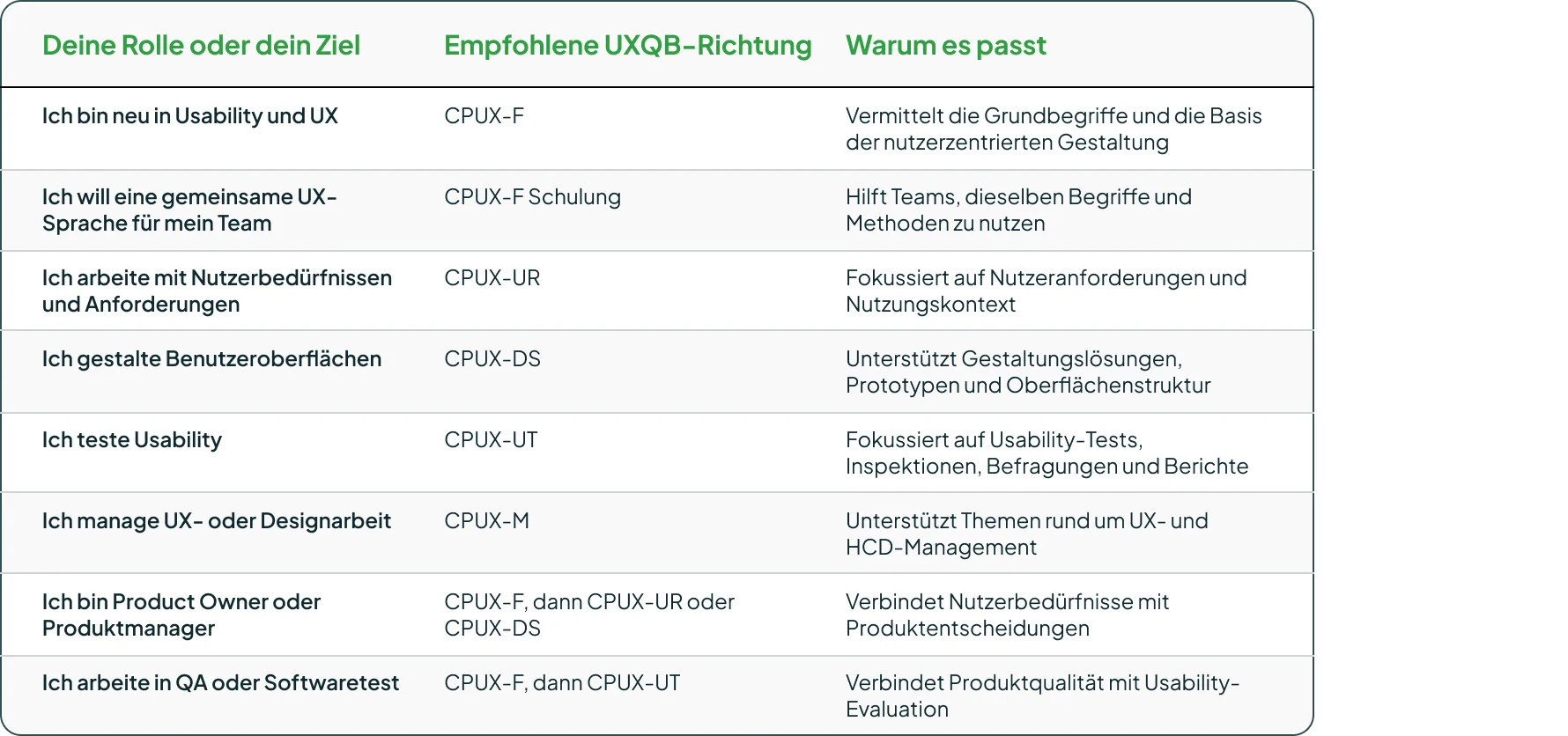
Die folgende Tabelle gibt dir einen einfachen Überblick, welche CPUX-Richtung zu welcher Rolle oder welchem Ziel passt.
Lohnt sich eine UXQB-Zertifizierung?
Eine UXQB-Zertifizierung lohnt sich, wenn deine Arbeit mit Nutzern, Oberflächen, Produktqualität oder digitalen Services zu tun hat.
Dazu zählen UX, Usability, Produktdesign, Produktmanagement, Anforderungsarbeit, Testen und digitale Produktrollen.
Der Wert geht über das Zertifikat hinaus. UXQB hilft dir, klarer über Nutzer und ihre Bedürfnisse nachzudenken. Du lernst, auf die Aufgaben zu schauen, die Menschen erledigen wollen, zu erkennen, wo sie hängen bleiben, und zu verstehen, warum sich ein Produkt schwerer bedienen lässt als nötig.
Für UX- und Usability-Rollen stärkt UXQB außerdem dein berufliches Profil. Es zeigt, dass du die zentralen Begriffe, Methoden und Ideen hinter nutzerzentrierter Gestaltung verstehst.
Aber UXQB ersetzt kein starkes Portfolio, keine echte Nutzerforschung und keine tägliche Designpraxis. Du musst trotzdem mit Nutzern sprechen, Ideen testen, aus der Produktnutzung lernen und echte Erfahrung aufbauen.
Weniger Wert bringt UXQB, wenn deine Rolle keinen klaren Bezug zu Nutzern, Oberflächen, Produktqualität oder digitalen Services hat.
Also, lohnt sich eine UXQB-Zertifizierung? Ja, wenn deine Arbeit davon abhängt, Produkte klarer, einfacher und näher an echten Nutzerbedürfnissen zu machen.
Warum eine UXQB-Schulung hilft
Du brauchst nicht immer einen Kurs, um dich auf UXQB vorzubereiten. Für manche reicht Selbststudium.
Trotzdem macht eine Schulung das Thema oft leichter, besonders wenn UX neu für dich ist. Ein Kurs gibt dir einen klaren Weg durch das Curriculum. Du sitzt nicht allein mit Begriffen und Definitionen. Du siehst, was sie in der echten Produktarbeit bedeuten.
Ein Trainer erklärt schwierigere Ideen mit einfachen Beispielen. Du stellst Fragen, arbeitest dich durch Übungen und lernst, wie Menschen in verschiedenen Rollen über dasselbe Nutzerproblem denken.
Das ist wichtig, weil UX mehr ist als Theorie. Es geht um Entscheidungen, Aufgaben, Feedback und echte Menschen, die ein Produkt ohne Stress nutzen wollen.
Selbststudium passt gut, wenn du die Grundlagen schon kennst und einen klaren Lernplan hast. Eine Schulung passt besser, wenn du Struktur, Beispiele, Feedback und eine klarere Vorbereitung auf die Prüfung willst.
UXQB, IREB, ISTQB oder iSAQB: Wo liegt der Unterschied?
Diese Zertifizierungen konkurrieren nicht miteinander. Sie betrachten verschiedene Teile desselben Softwareprojekts. Jede beantwortet eine andere Frage.
IREB
IREB kommt meist früh ins Spiel.
Es konzentriert sich auf Requirements Engineering. Es hilft Teams zu verstehen, was sie bauen müssen und warum. IREB ist nützlich, wenn ein Team vor der Entwicklung Nutzerbedürfnisse, Geschäftsziele, Umfang und Anforderungen klären muss.
iSAQB
iSAQB kommt ins Spiel, wenn das Team anfängt, über die technische Gestaltung nachzudenken.
Es konzentriert sich auf Softwarearchitektur. Es hilft Teams zu entscheiden, wie das System strukturiert sein soll. Das ist nützlich, wenn Teams Entscheidungen zu Qualität, Wartbarkeit, Abhängigkeiten, Schnittstellen und langfristigem Systemdesign treffen müssen.
ISTQB
ISTQB konzentriert sich auf Softwaretest.
Es hilft Teams zu prüfen, ob das Produkt wie erwartet funktioniert. Es gibt Teams außerdem einen klaren Weg, Fehler zu finden und zu steuern. Das ist nützlich, wenn Teams eine gemeinsame Testsprache und eine bessere Art brauchen, Tests zu planen, zu entwerfen und zu managen.
UXQB
UXQB konzentriert sich auf Usability, User Experience und nutzerzentrierte Gestaltung.
Es hilft Teams zu verstehen, ob Menschen das Produkt mit Leichtigkeit nutzen. Das ist nützlich, wenn ein Produkt technisch funktioniert, Nutzer aber trotzdem an Aufgaben, Formularen, Navigation, Formulierungen oder am gesamten Ablauf scheitern.
Eine einfache Art, den Unterschied zu sehen:
IREB hilft, das Ziel zu definieren. iSAQB hilft, die Lösung zu formen. ISTQB hilft, das Ergebnis zu prüfen. UXQB hilft zu prüfen, ob Menschen es verstehen und gut nutzen.
UXQB oder allgemeine UX-Schulung?
Eine allgemeine UX-Schulung hilft, aber der Begriff deckt vieles ab.
Manche Kurse vermitteln Design-Tools. Andere konzentrieren sich auf Portfolios, UI-Design, Forschung, Produktdesign oder Design Thinking.
Eine UXQB-Schulung ist fokussierter.
Sie gibt dir eine klare Basis in Usability, User Experience und nutzerzentrierter Gestaltung. Du lernst gemeinsame UX-Begriffe, Methoden und Prozesse, sodass du und dein Team dieselbe Sprache sprecht.
Eine UXQB-Schulung ist eine gute Wahl, wenn du einen strukturierten Einstieg in UX willst, dich auf die CPUX-Zertifizierung vorbereiten musst oder willst, dass dein Team konsistenter mit Usability arbeitet.
Fazit
Ein Produkt funktioniert vielleicht und fühlt sich trotzdem schwer bedienbar an.
Genau hier zählt UXQB. UXQB hilft Teams, über Funktionen hinauszuschauen und eine bessere Frage zu stellen: Nutzen Menschen dieses Produkt ohne Verwirrung?
Eine CPUX-Schulung gibt Lernenden einen klaren Weg in Usability, User Experience und nutzerzentrierte Gestaltung. Designer, Produktteams, Tester, Entwickler und Projektteams lernen dieselbe UX-Sprache, was die tägliche Arbeit reibungsloser macht.
Für manche Menschen funktioniert Selbststudium gut. Eine Schulung bringt oft mehr Wert, wenn du Beispiele, Übungen, Feedback und eine klare Vorbereitung brauchst.
Du brauchst Hilfe bei der Wahl des richtigen CPUX-Kurses für deine Rolle? Besuche die UXQB-Boardseite bei BilduX und vergleiche die verfügbaren Schulungsoptionen nach Thema, Format und nächstem Schritt.